

Date Auto Swiper & Location Changer: Find The Right Matches



Date Auto Swiper gives you a Tinder Passport-style location changer plus our Auto Swiper feature.
These features allow you to change your Tinder location to anywhere in the world, and automatically swipe matches in that location each day.
To see your matches, simply use Tinder like you normally do and watch as your matches appear from the location you chose!
Date Auto Swiper
Date Auto Swiper (also known as a date auto liker) helps you get more matches — it can auto swipe right on everyone, or mix up the swiping to swipe left or right randomly based on any percentage you choose. It’s a great alternative to paying for Tinder Features if you’re mainly looking for a passport-style setup. We will automate your swipes and attempt to swipe right on over 1000 profiles each day. It runs every two hours and will attempt to swipe up to 120 times, or until you reach your daily swipe limit. It’s the quickest way to get lots of matches — hassle free!
Date Auto Swipe Features
Includes a Tinder Passport-Style Location Changer
Date Auto Swiper also lets you control your location — if you have access to this feature on Tinder. You can change your location simply by clicking the "Change Location" button in our dashboard. Alternatively, we have a Chrome extension that can be used to change your location as well — simply click a new location in either the Chrome extension or the website dashboard.
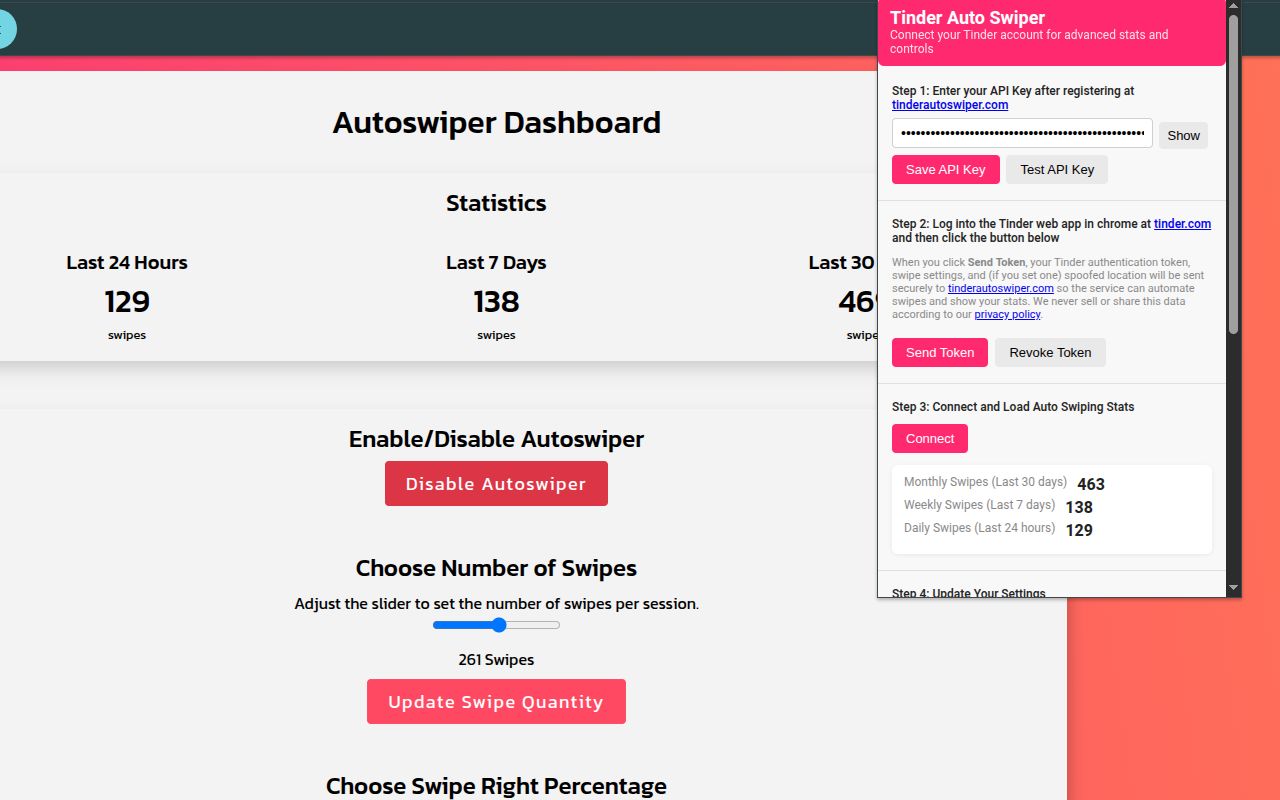
Date Auto Swiper Chrome Extension
 Register To Get Started
Register
Register To Get Started
Register
How Date Auto Swiper Works (for Tinder)

2.

AUTHENTICATE
Download the
Chrome extension
to authenticate
Simply follow the steps in the Chrome extension to link your Tinder account. You will send a token to Date Auto Swiper which will allow us to auto swipe for you. The purpose of the Chrome extension is to pass us this token and let you control settings without repeatedly logging in.

Blog
We also wanted to help you out with all of your Tinder swiping questions and curiosities, so we have created a small blog with some interesting posts. The first thing we wanted to do was answer everyone’s question: How to get more matches on Tinder
We also share tips like profile ideas, openers, and examples — plus how our automation can help you get more exposure. Please read the articles to learn more Tinder tricks for getting more Tinder matches and more Tinder dates.
Next we wanted to help our users out with some Tinder bio examples since we have seen tons of Tinder bios! We have compiled a list of Tinder bios from around the world (mostly in English) so you can check them out! These are very average Tinder biographies and are just meant to be examples — Click Here to see them!
Additionally, we found so many of the Tinder bios amusing that we needed to compile our own list! We searched for the funniest Tinder bios and funniest Tinder memes and include them on our blog. Check Them Out Here
We are currently working on adding more content, and plan to write about: Tinder pick up lines, best Tinder bios, Bumble vs Tinder, no matches on Tinder, how to start a conversation on Tinder, how to get Tinder Features free, and much more!
Stay tuned for our future posts!
TESTIMONIALS

Cool App!
I am taking a vacation next month and it was great to be able to match with some locals before I start my vacation. This is a great alternative to paying for Tinder Features if you're mainly looking for the passport-style option. Highly recommended!
Works as Described!
I tried Date Auto Swiper to see what it was all about — it works as described. You can change your location and let it swipe for you every day. Happy so far with the experience.
Great Features!
I have really liked using this so far because it allows me to forget about swiping each day and just instantly get matches. I don't have to spend so much time swiping and can just see everyone that matched with me right away. Thanks for making this!

Register To Get Started Register
